Notes from the Offensive Security course at NYU by Ian Dupont
The Basics
Binary
- Identify information using
filecommand:- Dynamically linked vs Statically linked
- LSB: Least Significant Bit first, as opposed to MSB (Most Significant Bit). This distinction is extremely important for us as reverse engineers and exploit devs. This means that every number, whether it be 1-8 bytes, has the least significant bit/byte first. For instance, the value
0xdeadbeefwill have its least significant byte (0xef) stored in memory before the second least significant byte0xbe - pie: PIE is turned on or not
- Version 1 (SYSV): the binary uses the System V ABI format, which defines specific program parameters such as the calling convention into functions.
- Stripped/not stripped: whether or not the symbol (function and data) names have been removed from the binary.
- See shared object dependencies using
lddcommand
Dynamically Linked Binaries
Pros
- Size: output binary is small and its
codeanddatasections (more on these later) contain only instructions and data from the source code file(s) - ASLR security: ASLR stands for Address Space Layout Randomization. We will talk about this more in depth later, but essentially every shared library required to fulfill the imported functionality exists at a unique, random address in memory. The stack is also randomized to a different address range every execution. This means an attacker has to go through much more work to locate potentially necessary code for an exploit (boo!)
- Size: output binary is small and its
Cons
- Potential Linking Errors: this is usually not the case for standard libraries like
glibcon Linux, as they are generally tested to be thoroughly backwards compatible. However, compiling code against unique shared libraries or different target systems (e.g.uClibcfor embedded devices) may lead to inconsistencies in functionality and compiler/linker errors
- Potential Linking Errors: this is usually not the case for standard libraries like
Statically Linked Binaries
Pros
- Portability: all the possible code to be executed is included in the binary. This means a binary can be executed on different systems that do not have the shared functionality (libraries) upon which the program depends
- Plug-and-play: useful for shipping a final product that the end user can “plug and play”
Cons
- Bloat: the compiler does not discriminate between shared functionality that is used or not used within the required library. Therefore, importing a single function from a library includes the entire library in the output. Standard libraries are especially large
- Loses ASLR mitigations: the entire binary and all linked libraries are combined into a single executable, which starts at a single (potentially random) address in memory. Therefore, an attacker which identifies that address has access to ALL executable code, data, etc. at their disposal. This effectively nullifies the benefit of ASLR
Memory Layout
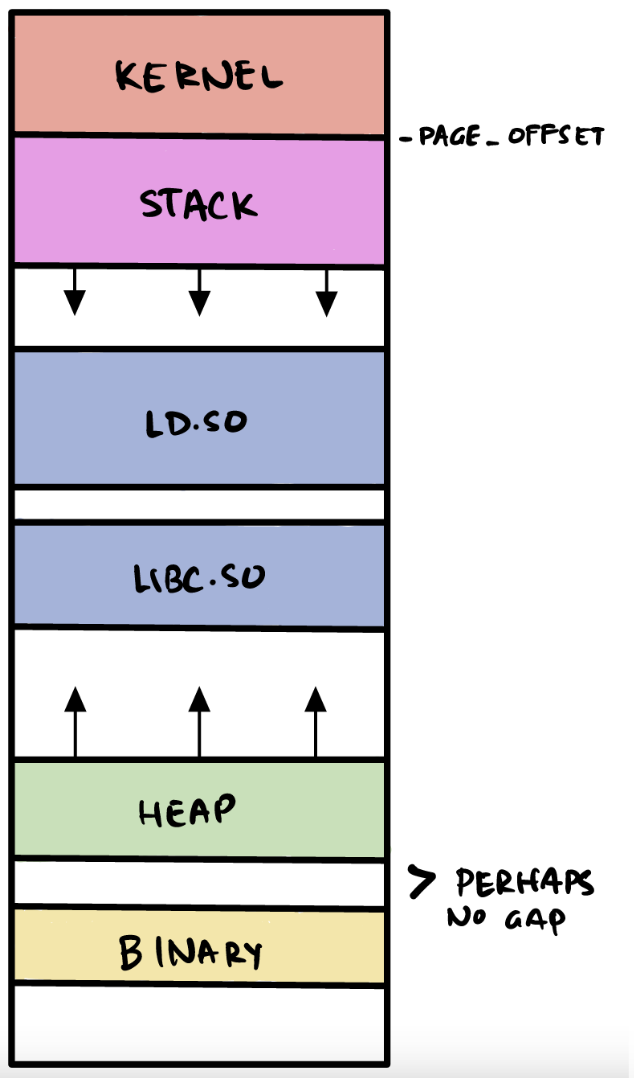
Linux processes
- Kernel is “mapped” into each process at a predetermined offset
- The kernel code is unreachable by the process without a syscall
- Typically begins at
0xffff888000000000on x86-64 processes - Value configured at the
PAGE_OFFSETkernel configuration option
- Stack grows from higher -> lower addresses
- Normally located around
0x00007ffXXXXXX000
- Normally located around
- Then come shared (linked) libraries
- Then after a large gap comes heap, which grows upwars (lower -> higher addr)
- Symbols
- Functions or (global or exported) variables: local variables don’t need naming because they are reffered using offsets
- Stripped and static binaries output no symbol information
readelf -Wsto view symbols.symtabcontains local and exported symbols.dynsymcontains dynamically linked imports
- Addresses
- For shared libraries, the base address can vary, thus the address seen by readelf will vary on each run. But the offset is unchanging.
- Can use this fact by leaking a known address and calculating the address of the function we want.
- For executables, depends on PIE.
Symbols
readelf -Wsto show symbols in a binary- For shared libraries like glibc, they are offsets. All linked objects in the runtime, such as glibc and the linker/loader, end up with a randomized base address from ASLR. Therefore, their
readelfoutput values are all offsets from the library’s base address. - For an executable, the answer is it depends on PIE. If PIE is on, the same situation as a shared object arises: PIE randomizes the base address and thus the binary has been compiled with relative offsets for its symbols.
- If PIE is off, then the binary has hardcoded addresses for its symbols. This means the addresses shown by
readelfare absolute addresses, and the functions/variables are always mapped into memory with those addresses.
Binary Protections
ASLR
- Address Space Layout Randomization
- Effectively, the linker maps all shared libraries into memory at unique random addresses and defines a unique address range for the stack for each program execution. ASLR prevents an attacker from knowing, before runtime, where certain libraries—and the associated code and data in those libraries—will exist in memory. It makes exploitation much harder, typically requiring one or more “leak primitives” during exploitation to shed light on the addresses of these libraries.
- Linker maps all shared libraries into memory at random addresses
- Also defines a unique address range for the stack
- Need “leak primitives” to beat it (figure out where the library is stored
- in memory)
- ASLR is configured in the
/proc/sys/kernel/randomize_va_spacefile that is only writable by sudoers. - 0 is turned off, 1 is partial randomization, 2 is full randomization
PIE
- Position Independent Executable
- ASLR does NOT randomize the location of the program executable. That is what PIE is for.
- Essentially, the compiler implements PIE by stubbing out code jumps to offsets from a randomized base address that is generated at runtime. In non-PIE binaries, these jumps are hard-coded to a known address since no randomization is performed.
- effectively think of PIE as ASLR for the binary.
- No-PIE is designated by a compilation flag
-no-pie -fno-pic, otherwise PIE is on by default for modern GCC. - Identify if enabled in a binary using the
filecommand
Pwntools
- Always deals with bytes, not strings
- Useful functions: sendline, recv, recvline, recvuntil, interactive, remote, process
context.log_level = "DEBUG"for debug logging